Volume discounts that reward the bigger cart
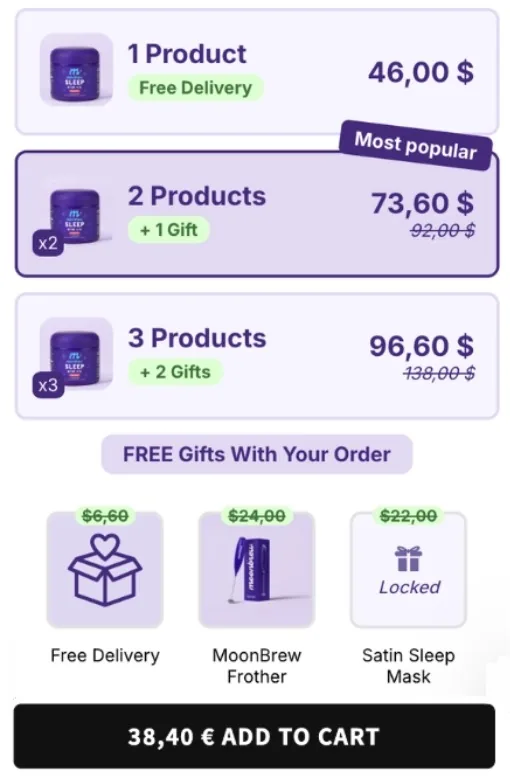
Quantity breaks that make the second and third unit obviously worth it, with the discount applied automatically and the saving shown on the product page.
How merchants use it
Quantity breaks
Set the tiers you want — 2 for 10% off, 3 for 20% — and let the shopper see the saving before they add to cart.
Auto-applied discounts
No discount code to communicate, no abandoned cart because a code did not work.
Gifts on top
Combine a quantity break with a free gift that unlocks at the same tier, so the offer reads as one decision.
Live in 10 minutes
Install
One click from the Shopify App Store. No theme edits, no code.
Set your tiers
Choose the quantities and the discount for each step, on one product or a whole collection.
Measure
A/B test the tiers against each other and keep the version with the higher revenue per visitor.
Frequently asked
How many tiers can I set?
You define the quantities and the discount for each step, on a single product or a whole collection.
Can a quantity break include a gift?
Yes. A free gift can unlock at the same tier as the discount, so the offer reads as one decision for the shopper.
Does the shopper see the saving before adding to cart?
Yes. The saving is shown on the product page, at the moment the quantity is chosen.
The other modules
 MoonBundles
Bundles, volume discounts, free gifts, cart drawer and post purchase upsells in one Shopify app, now connected to your AI.